tolles Plugin
Flowizo
Shape the easing of Fusion keyframes with curves. Pick a preset or draw your own, and apply it to the keyframes you selected. A free plugin for DaVinci Resolve.
Free925 downloads Download
Flowizo is good. It makes animatinh multiple clips at once.
But it would be great if you could add this:
- DVE feature. So we don't have to add DVE node.
- Edit page version (but I don't this one is possible, bcz in edit page it can be added to only one clip)
thanks for the feedback, take a look at AnimizoFX, it has a DVE mode now and works on the edit page
Write a review
After you download Flowizo, your download email has a Leave a review link. Reviews written there appear here labelled Verified download.
Write a review as a Clipizo member
Uses a free Clipizo account. Your review is labelled Clipizo member and appears after approval.
Verified reviews come from Clipizo downloads · Member reviews are moderated · No review is hidden for its rating.
Overview
Flowizo opens as a window on the Fusion page of DaVinci Resolve. Pick an easing curve, highlight keyframes in Fusion's Spline Editor and apply it: the motion between them takes the curve's shape.
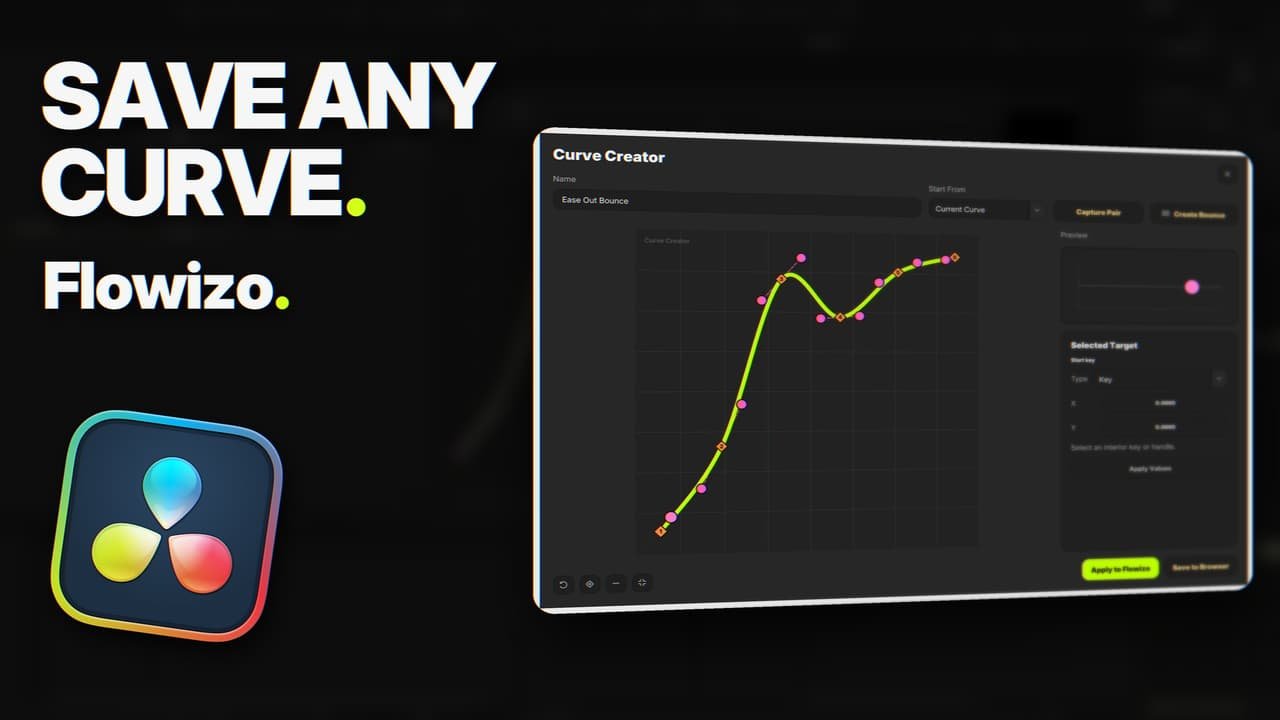
Choose from the presets, keep your favorites one click away, or draw your own curves and bounces in the Curve Creator and save them.
It works on any keyed control of any Fusion node, positions and paths included, on every highlighted pair of keyframes at once or at the playhead.
Flowizo is free. The download includes the installers for Windows and macOS and your free license key.
Requirements
- Software
- DaVinci Resolve or Resolve Studio (tested with Resolve 21.2), on the Fusion page
- Operating system
- Windows 10 (version 1903 or later) or Windows 11, 64-bit; macOS 12 or later on Apple silicon or Intel (Resolve 21.1 itself needs macOS 15 on Apple silicon)
- License
- A free key comes with the download; one key covers up to 2 computers, with an online check every 30 days
- Download
- Installers for Windows and macOS on your personal download page
Questions about your setup? Ask in the Clipizo Discord or send us a message.
Key features
- Curve presets with thumbnails, and a Favorites row for the ones you use most.
- A preset Browser with your own saved curves, and JSON import and export.
- The Curve Creator for custom curves and bounces.
- Selected applies the curve to every highlighted pair of keyframes at once; Playhead applies it where the playhead is.
- Works on any keyed control of any Fusion node. Positions and paths take the shape too.
- Reads the curve your keyframes have now into the graph, so you can start from the animation you made.
- Precision controls with exact X and Y values and snap steps.
- Mirror and Overshoot handles, flip curve and flip view.
- Undo, which also undoes what you applied in Resolve.
- Three window sizes: Small and Smaller draw the whole window smaller, for a small screen.
- Compact Mode, pin on top, and minimize when you switch apps.
- One free key covers up to 2 computers.
Best for
- Smooth ease-ins and ease-outs on Fusion animations
- Bounces and overshoot on titles and logos
- One easing style across a whole composition
- Your own curves, reused in every project
Setup & help guide for Flowizo Install, find it in Resolve, the controls, common problems, uninstall
Flowizo 1.26: Windows 10 (version 1903 or later) or Windows 11, 64-bit; macOS 12 or later on Apple silicon or Intel (Resolve 21.1 itself needs macOS 15 on Apple silicon). DaVinci Resolve or Resolve Studio (tested with Resolve 21.2).
Install
- Save your project and close DaVinci Resolve. On Windows, Setup offers to close Resolve if it is open with Flowizo loaded.
- Windows: run Flowizo-1.26-Windows-x64-Setup.exe and allow the administrator prompt: it adds the plugin for every user of the computer. If “Windows protected your PC” appears, choose More info, then Run anyway. The installer isn't signed. Accept the license, click Install, then Finish.
- macOS: open Flowizo-1.26-macOS-universal.pkg. If macOS won't open it, right-click it, choose Open, then Open again. If it is still blocked, open System Settings → Privacy & Security and choose Open Anyway. The package isn't notarized by Apple. Accept the license, click Install and enter your Mac's administrator password.
- The plugin goes to C:\Program Files\Common Files\OFX\Plugins on Windows, or to /Library/OFX/Plugins on a Mac (Flowizo.ofx.bundle), for every user of the computer. Flowizo's entry goes into Workspace > Scripts > Clipizo, beside your other Clipizo tools, for the user who runs the installer: on a computer with several users, each of the others runs the installer once to get the entry.
- Start DaVinci Resolve.
- Coming from Flowizo 1.23 or older: install over it. The new Flowizo has your license, your saved curves and your favorites the first time it opens. On Windows the old version stays in Settings > Apps as “Flowizo Setup”; the new Flowizo doesn't use it, so you can uninstall it there. On a Mac, quit the old Flowizo app; you can move it to the Trash, but don't run its uninstaller: it would also move the saved curves and settings the new Flowizo uses to the Trash. The first time the new Flowizo opens there, macOS asks for your login password so that Resolve can read the license the old version kept in your keychain: enter it and choose Always Allow.
Where it appears in Resolve
Open a project, go to the Fusion page and choose Workspace > Scripts > Clipizo > Flowizo.
Or add the Flowizo effect (Effects > OpenFX > Clipizo) and click Open Flowizo in the Inspector.
The first time, paste the free key from your download email on the activation screen and click Activate (the key is also shown on your personal download page). It needs an internet connection. One key covers up to 2 computers.
Controls in plain words
Some controls appear only after choosing the relevant mode.
Curves
- Favorites
- Your favorite presets, one click each. The last tile, Browse Presets, opens the browser.
- Presets browser
- Lists Favorites, the built-in Presets and Custom, your own saved curves. Double-click a tile to load it, star it to add it to Favorites, or right-click it and choose Edit in Curve Creator. Import JSON and Export JSON read and write a curve as a file.
- Save current curve
- The plus button saves the curve in the graph under a name. Tick Add to Favorites to put it in an empty Favorites slot.
- Curve Creator
- A window of its own for curves with up to 7 keys. Start From the current curve or a preset, or click Capture Pair to start from the keyframes you targeted in Fusion. Create Bounce builds a bounce from Keys, Damping, Strength and Height. Apply to Flowizo sends the curve to the main window; Save to Browser keeps it under Custom.
Applying
- Selected
- The default. Highlight keyframes in Fusion's Spline Editor: Flowizo shapes every highlighted pair of neighbouring keyframes at once.
- Playhead
- Targets the pair of keyframes around Resolve's playhead, on the control chosen in the list beside it.
- Control list
- Chooses which keyed control of the selected Fusion node Flowizo reads and applies.
- Apply To Resolve
- The lime button. The motion between the two keyframes takes the curve; the keyframes keep their frames and values. Positions and paths take the curve's shape and timing.
- Show current Fusion spline
- The eye button reads the targeted keyframes' curve from Resolve into the graph.
- Undo
- Takes back your last change to the curve, or your last Apply in Resolve.
Shaping
- Graph
- Drag the two handles to shape the curve. The mouse wheel zooms, dragging with the middle button pans and 0 resets the view. Right-click a handle for Independent Handles and Snap to grid.
- Flip curve shape
- Ease Out becomes Ease In.
- Flip view
- Shows the curve the way it reads in Fusion, top and bottom swapped. The curve itself stays.
- Mirror
- Links the other handle in the opposite direction.
- Overshoot
- Lets a handle go beyond the curve's range.
- Fit graph
- Fits the graph to the keyframes.
- Precision controls
- Exact X and Y for the selected handle: type a value, or drag left and right. Snap sets the handle's step: Off, Grid, 1/4, 1/8, 1/16, 0.05 or 0.01. Copy and Paste take the values; Paste also reads a cubic-bezier.
Window and settings
- Compact Mode
- Ctrl+M makes the window smaller, without Favorites and the status line. Esc or Ctrl+M brings it back.
- Pin
- Keeps the window on top.
- Connection dot
- Lime when Flowizo is connected to Resolve. When it is red, click it to see how to connect.
- Settings
- The cog. License has Activate, Refresh for the online check, and Deactivate, which releases this computer from your key. Panel colour is Neutral or Resolve blue, and Favorites limit is 5, 10 or 15. Window size is Normal, Small or Smaller: it draws the whole window smaller. Minimize on app switch hides the window when you go to another app and brings it back when you return.
Common problems
- Windows says it protected your PC
- Click More info, then Run anyway. The installer isn't signed.
- Windows blocks the installer (error 4551)
- Flowizo isn't code-signed yet, and Windows 11's Smart App Control blocks apps that aren't. Flowizo installs and loads only on a PC where Smart App Control is off (Windows Security > App & browser control). Turning it off lowers Windows' protection, and some Windows versions can't turn it back on without a reset, so check that before you decide.
- A Mac won't open the package
- Right-click it, choose Open, then Open again. If macOS still blocks it, use System Settings > Privacy & Security > Open Anyway.
- Flowizo isn't in Workspace > Scripts > Clipizo
- Restart DaVinci Resolve. If it is still missing, run the installer again while Resolve is closed, as the user who needs the entry.
- “Not connected to Resolve”
- Open Flowizo from Workspace > Scripts > Clipizo > Flowizo on the Fusion page. If the message stays, restart Resolve and open it from that menu again.
- “Open the Spline Editor, highlight two adjacent keys, then try again”
- Selected needs keyframes highlighted in Fusion's Spline Editor: highlight at least two neighbouring keyframes of one curve, or switch to Playhead.
- “Keyframe a control on the node selected in Fusion, then try again”
- Flowizo shapes keyframes that are already there. Select a node in Fusion that has an animated control.
- Activation does not work
- Activation needs an internet connection. One key covers up to 2 computers: to move it, open Settings > License > Deactivate on a computer you no longer use.
- “Online check needed”
- Flowizo checks your key online every 30 days. Click Check online, or open Settings > License > Refresh. If the server can't be reached at that moment, your license keeps working and Flowizo tries again later.
Uninstall
- Close DaVinci Resolve, then open Windows Settings > Apps, find Flowizo and choose Uninstall. This removes the plugin and its Scripts menu entry. macOS: quit Resolve, then move Flowizo.ofx.bundle in /Library/OFX/Plugins and Flowizo.lua in ~/Library/Application Support/Blackmagic Design/DaVinci Resolve/Fusion/Scripts/Utility/Clipizo (only that file: the other Clipizo tools there stay) to the Trash.
- Your settings, license and saved curves stay, so a reinstall keeps them.
Still stuck? Open %LOCALAPPDATA%\Clipizo in File Explorer (on a Mac, ~/Library/Application Support/Clipizo in Finder) and search it for plugin.log, then contact Clipizo with that file, your Resolve version, your system's version and the exact message.
Get Flowizo
Check the requirements first.
Free925 downloads Download
Updates log
v1.26
Flowizo v1.26 lets Playhead apply a curve to every keyed control at once. Download it again to get it.
What's new in 1.26
- Playhead can now apply to every keyed control at once: pick All keyed controls in the control list, and one Apply writes them all, with one Undo for all.
- With one control picked, Flowizo now tells you which other controls on the node are keyed.
v1.25
Flowizo v1.25 applies a curve to several nodes at once, with Selected keys and with Playhead. Download it again to get it.
What's new in 1.25
- Selected keys now writes every highlighted key pair on several nodes at once, and one Undo puts them all back.
- Playhead now applies the curve to every selected node, each at its own keys.
v1.24.2
Flowizo v1.24.2 makes Selected keys work with an undocked Spline Editor, and says why when activation can't reach the license server. Download it again to get it.
What's new in 1.24.2
- Selected keys works with an undocked Spline Editor.
- If activation can't reach the license server, Flowizo now says why.
v1.24.1
Flowizo v1.24.1 makes Selected keys work with keyframes on a node's modifier, and moves Flowizo into Workspace > Scripts > Clipizo. Download it again to get it.
What's new in 1.24.1
- Selected keys works with keys on a node's modifier, such as a Text+ Follower.
- Flowizo's entry is now in Workspace > Scripts > Clipizo, next to your other Clipizo tools.