Back to Home

Waterizo

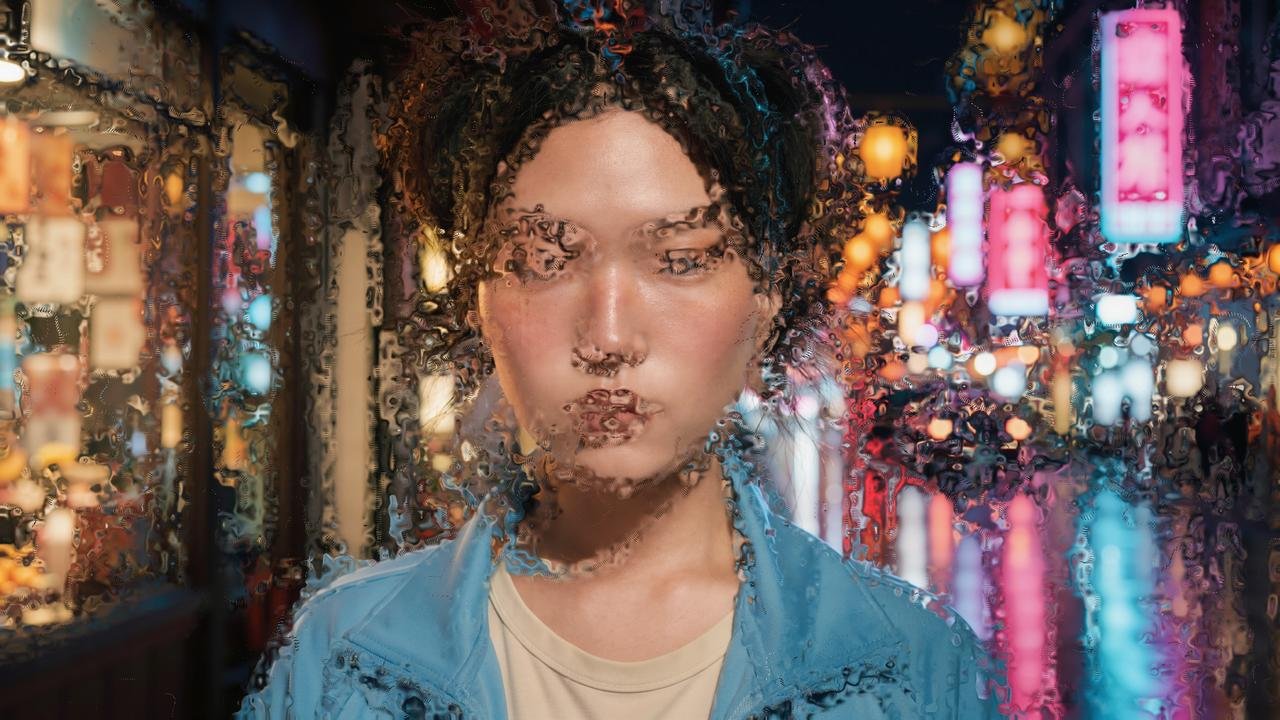
Turn footage into flowing water. Pixels stream and gather along currents that wrap around the shapes in the frame. Free to download.

Free16 downloads Download

Reviews

No reviews yet. Used Waterizo? Be the first to share how it went.

Write a review

After you download Waterizo, your download email has a Leave a review link. Reviews written there appear here labelled Verified download.

Write a review as a Clipizo member

Uses a free Clipizo account. Your review is labelled Clipizo member and appears after approval.

Verified reviews come from Clipizo downloads · Member reviews are moderated · No review is hidden for its rating.

Overview

Connect footage, a title or a logo to Waterizo. Water runs through the Dark Areas or the Bright Areas, and Bitmap Follow sets how closely it keeps to the picture. Flow Mode picks where it goes: Follow Form wraps it around the shapes in the frame, Currents sends it along swirling currents, and Fixed Angle sends it one way.

Flow Speed makes the water move, and Draw-On reveals it in a loop. Keep the video under the water, dimmed or blurred, or render only the water on transparency.

Requirements

Software
DaVinci Resolve 21.1 or newer, Free or Studio, on the Fusion page, or Fusion Studio
Operating system
Windows 10 or 11, 64-bit; macOS 15 or later on Apple silicon (Resolve 21.1's minimum)
License
None: no key, no activation and no account
Download
One ZIP for Windows or macOS with the Studio installer, Waterizo.fuse and the Edit page effect

Questions about your setup? Ask in the Clipizo Discord or send us a message.

Key features

  • Choose where the water runs: Dark Areas or Bright Areas, with Bitmap Follow for how closely it keeps to the picture.
  • Three flows: Follow Form, Currents (with Current Scale and Turbulence) and Fixed Angle (with Flow Angle).
  • Flow Speed animates the water, and 0 keeps it still. Draw-On reveals it in a loop.
  • Streaks: Seed Level, Streak Density and Streak Length.
  • Composite: the video under the water with Background Opacity and Background Blur, or only the water on transparency, and Blend back to the original.
  • Draft, Normal and High quality.
  • Also an effect on the Edit page: Effects > Clipizo > Waterizo.
  • Free download, no key.

Best for

  • Music videos
  • Dreamy and underwater looks
  • Logo and title reveals
  • Stylized portraits
  • Animated backgrounds
  • Transitions
Setup & help guide for Waterizo Install, find it in Resolve, the controls, common problems, uninstall

Waterizo v1.0, the flowing water Fuse.

Install
  1. Extract the complete ZIP before installing, and read legal/CLIPIZO_PRODUCT_LICENSE.txt.
  2. Resolve Studio / Fusion Studio: drag Waterizo studio installer.lua into the Nodes area of the Fusion page. The result appears in the Console. Then restart. The installer also adds the Edit page effect.
  3. Resolve Free (works in Studio too): close Resolve and copy Waterizo.fuse into your user Fuses folder, creating it if needed. Resolve Free doesn't run the Studio installer.
  4. Windows user Fuses folder: %APPDATA%\Blackmagic Design\DaVinci Resolve\Support\Fusion\Fuses
  5. macOS user Fuses folder: ~/Library/Application Support/Blackmagic Design/DaVinci Resolve/Fusion/Fuses/
  6. Edit page effect by hand: copy Waterizo.setting and Waterizo.png into Templates/Edit/Effects/Clipizo inside the same Fusion folder, creating the folders if needed.
  7. Keep one copy of Waterizo in your Fuses folders, and restart Resolve after installing or updating.
Where it appears in Resolve

On the Fusion page, press Shift+Space and type Waterizo. In the Effects Library it is under Clipizo.

Connect footage, a title or a logo to its input, and its output to MediaOut1 or a Merge.

On the Edit page it is under Effects > Clipizo > Waterizo. Drag it onto a clip.

Controls in plain words

Some controls appear only after choosing the relevant mode.

Flow
Intensity
How strong the water is. 0 leaves the picture as it is.
Bitmap Follow
How closely the water keeps to the picture.
Bitmap Zones
Dark Areas or Bright Areas: where the water runs.
Flow Mode
Follow Form wraps the water around the shapes in the frame. Currents sends it along swirling currents. Fixed Angle sends it one way.
Current Scale / Turbulence
The size of the currents and how much they wobble.
Flow Angle
The direction for Fixed Angle.
Flow Pull
How far the water pulls the picture.
Flow Speed
Moves the water over time. 0 keeps it still.
Streaks
Seed Level
How dark or bright an area has to be before streaks start there.
Streak Density
How many streaks.
Streak Length
How long they are.
Composite
Background
Original keeps your video under the water. Transparent renders only the water.
Background Opacity / Background Blur
Dim or blur the video under the water.
Seed
A different arrangement of water.
Blend
Mixes the result back with the original.
Quality
Draft, Normal or High. High is the slowest.
Draw-On
Reveals the water itself, the flowing layer and the streaks, and repeats: a looping reveal.
Common problems
Not in the tool search
Extract the ZIP, check that the file still ends in .fuse, and restart Resolve after copying it. Use the user Fuses location for a manual install. Avoid installing a second copy of the same tool.
An older interface still appears
Resolve caches Fuse code. Fully restart it, then try a newly added node; an existing node may retain saved values.
It is slow
High quality is the slowest. Use Draft while editing.
The Edit page effect is missing
The Studio installer adds it. After a manual install, copy Waterizo.setting and Waterizo.png into Templates/Edit/Effects/Clipizo inside the same Fusion folder, then restart.
A Mac blocks the downloaded file
Use System Settings > Privacy & Security > Open Anyway.
Uninstall
  1. Close Resolve / Fusion. Move only Waterizo.fuse out of the Fuses folder where you installed it, to a backup folder outside the Fusion search folders.
  2. If you used the Studio installer, check the destination it reported (which can be the shared Clipizo/Fuses folder). Leave other Clipizo files in place.
  3. Restart the application. Existing projects using this tool will need it reinstalled to render the same result.
  4. Edit page effect: delete Waterizo.setting and Waterizo.png from Templates/Edit/Effects/Clipizo in the same Fusion folder.

Still stuck? Contact Clipizo with the plugin version, Resolve version, operating system and the exact error message.

Get Waterizo

Check the requirements first.

Free16 downloads Download